Changelog
We Ship. Often.
We’re continuously shipping new updates.
Discover the latest features and improvements we’ve imagined for you.
New Features
New Features
Units for Everything
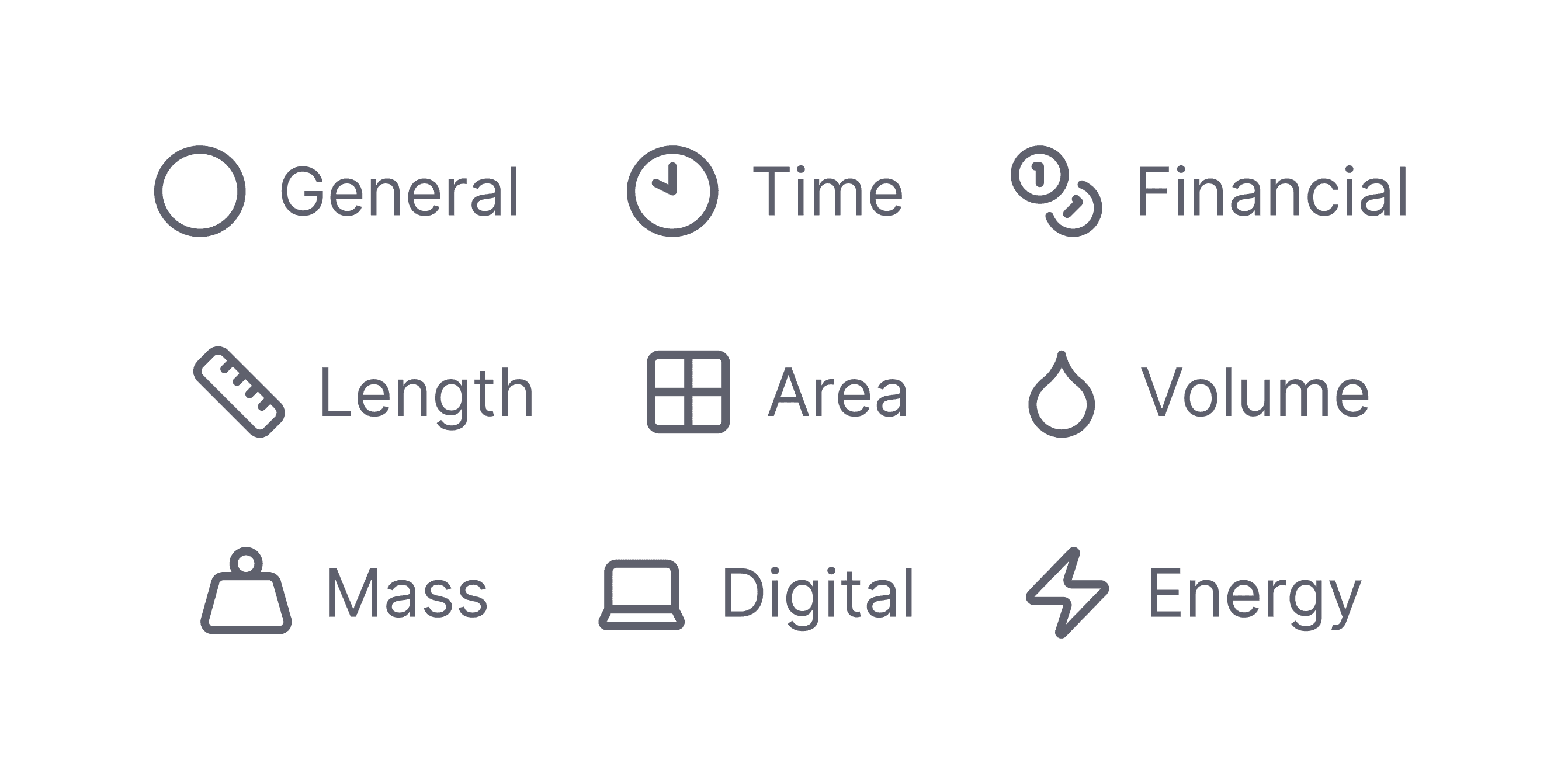
Not every cost item is best measured in currency. This release gives you a whole library of units to describe your budget exactly the way you think about it — and makes sure that choice follows your numbers everywhere they go.
Full Release Note
New Features
New Features
Plan every possibility
Main Budget
3.1
Production Unit
19.425,00 €
3.2.1
3.400,00 USD
2.900,20 €
Executive Producer
Amount
1
Prep
1
Shoot
3
Wrap
1
Fee
850,00
USD
3.2.2
2.400,00 €
Producer
Amount
1
Prep
1
Shoot
3
Wrap
1
Fee
600,00
EUR
3.2.3
2.400,00 €
Production Assistant
Amount
1
Prep
1
Shoot
3
Wrap
1
Fee
600,00
EUR
3.2.3
2.400,00 €
Production Assistant
Amount
1
Prep
1
Shoot
3
Wrap
1
Fee
600,00
EUR
Scenario 1
Service in Spain
3.1
Production Unit
– 2.573,00 €
19.123,00 €
3.2.1
3.300,00 USD
2.598,20 €
Executive Producer
Amount
1
Prep
1
Shoot
3
Wrap
1
Fee
750,00
USD
3.2.2
2.400,00 €
Producer
Amount
1
Prep
1
Shoot
3
Wrap
1
Fee
600,00
EUR
3.2.3
2.400,00 €
Production Assistant
Amount
1
Prep
1
Shoot
3
Wrap
1
Fee
600,00
EUR
3.2.3
2.400,00 €
Production Assistant
Amount
1
Prep
1
Shoot
3
Wrap
1
Fee
600,00
EUR
Scenario 2
Service in Mexico
3.1
Production Unit
+10.684,00 €
30.109,00 €
3.2.1
3.400,00 USD
2.900,20 €
Executive Producer
Amount
1
Prep
1
Shoot
3
Wrap
1
Fee
850,00
USD
3.2.2
2.400,00 €
Producer
Amount
1
Prep
1
Shoot
3
Wrap
1
Fee
600,00
EUR
3.2.3
2.400,00 €
Production Assistant
Amount
1
Prep
1
Shoot
3
Wrap
1
Fee
600,00
EUR
3.2.3
2.400,00 €
Production Assistant
Amount
1
Prep
1
Shoot
3
Wrap
1
Fee
600,00
EUR
Say hello to Budget Scenarios, a new way to explore production budgets without losing sight of your approved plan. Test alternatives, compare the impact, and stay ready for the next creative or production change.
Full Release Note
New Features
New Features
A Beautifully Reimagined Way to Budget
Download PDF
Social Media Campaign - Offer
We would like to begin by thanking you for asking us to provide an offer regarding the production of the above-mentioned project. We would be very pleased to realize this project with our director Regisseur in cooperation with you and your client.
1
Pre Production
6.575,00 €
1.1
Research, Scouting, Reccy
5.000,00 €
–
1x Location Scout for 1 Day
–
1x Location Archive for 1 Day
1.2
Casting
5.000,00 €
Video casting for 10 leading actors/actresses, exclusive callback in Berlin. Video casting for 8 supporting actors/actresses, exclusive callback in Berlin. Photo casting for 10 extras, exclusive callback in Berlin, aged between 20 and 70.
–
2x Project Manager for 10 Days
1.2
Miscellaneous
1.575,00 €
–
18 x Shooting Boards
Inklusive Directors Recce, inklusive Mietfahrzeug und Verpflegung
Inklusive Pre-PPM per Video mit Regie
Inklusive PPM per Video mit Regie
Inklusive Directors Shooting-Board zum PPM
2
Cast
15.000,00 €
2.1
Principal Actor / Actress
9.000,00 €
1 year of moving images: All media except cinema Including placement in social media feed + on YouTube Photo: Germany: DOOH, OOH, online, social media
Including placement in social media feed Germany.
For us, casting is a central part of the project. We attach great importance to reflecting a cross-section of Germany in the cast – different age groups, backgrounds and ethnicities.
Welcome to Splinde 1.5.0. This update marks a significant milestone in our journey to make budgeting not just efficient, but truly delightful. We’ve touched almost every corner of the experience, from a stunningly redesigned editor to powerful new document tools that help you turn numbers into professional offers in seconds.
Full Release Note
Fixes & Improvements
Fixes & Improvements
A Smoother Flow.
It’s all about keeping you in your flow state.
The Power of Enter
Great software should move at the speed of your thought. We’ve refined how you interact with input fields across the entire application.
Whether you are renaming a section in the sidebar, updating a variable, or tweaking a cost item’s fee, you can now simply hit Enter to confirm your change. It sounds simple, but it makes a world of difference. No more clicking away to save; just type, confirm, and keep moving. It’s intuitive, fast, and satisfying.
Improvements & Fixes
Overtime AddOn Refinements: We’ve tightened up the logic in our new Overtime tool. Deleting time markers on the slider now triggers an immediate recalculation, ensuring your totals are always accurate.
Smoother Permissions: We resolved an issue where team members (non-admins) occasionally faced errors when editing Overtime values. Collaboration is now seamless for everyone on the team.
Variable Stability: Fixed a bug where using a newly created variable for the very first time could result in a reference error. It now links instantly, every time.
Performance Boost: We’ve optimized the engine behind AddOns, making the creation process significantly snappier.
Under the Hood: We’ve upgraded our analytics and monitoring infrastructure. This helps us spot stability issues faster and ensures Splinde runs smoothly for everyone.
We hope these updates make your daily budgeting feel a little lighter and a lot faster. As always, we’re listening to your feedback to make Splinde even better.
New Features
New Features
Time, Beautifully Managed.
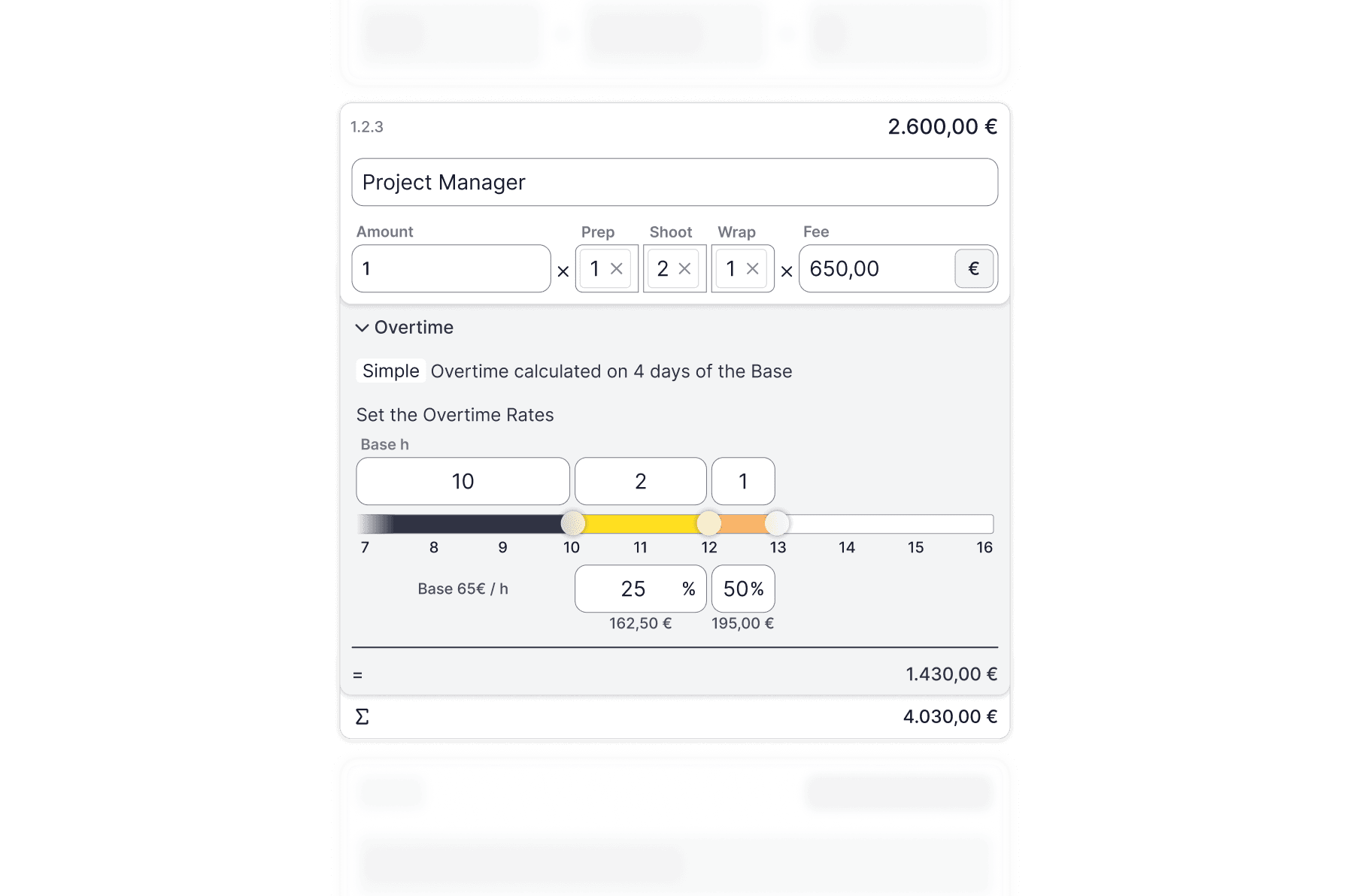
We are introducing the Overtime AddOn and the possibility to calculate Prep-, Shoot- and Wrap-Days. And much more.
This update is dedicated to the most valuable resource on your set: time. We’ve introduced powerful new tools to track it, manage it, and budget for it with unprecedented precision. From granular day breakdowns to a reimagined way to handle overtime, Splinde 1.4.0 gives you total control over your schedule and your budget.
Full Release Note
New Features
New Features
Sync in Sync.
Collaboration is at the heart of Splinde, and this update is all about making sure your teamwork is as seamless as possible. We’ve smoothed out the real-time syncing so you can build budgets together with total confidence, along with some thoughtful touches to improve your daily workflow.
Full Release Note
Fixes & Improvements
Fixes & Improvements
Exports, Uninterrupted.
We’re popping in with a quick but important update to ensure your workflow remains seamless. We believe that sharing your budget should be as effortless as building it, so this release is dedicated to making sure your documents are ready whenever you are.
🛠 Fixes & Improvements
Reliable PDF Downloads: We resolved an issue that was preventing some budgets from exporting correctly. You can now generate and download your PDF documents with confidence—crisp, clean, and ready for your team.
New Features
New Features
Precision Meets Performance
Welcome to Splinde 1.3.0. With this update, we’ve focused on the very core of your experience, making your calculations smarter, your large projects faster, and your workflow smoother than ever before. We think you’re going to love the difference.
Full Release Note
New Features
New Features
A Quantum Leap for Your Calculations
At the heart of Splinde is the power to handle complex numbers with ease. In version 1.2.8, we’ve performed a major upgrade to the engine that drives your budgets, making your experience faster, smarter, and more fluid than ever before.
Full Release Note
Performance
Performance
Enhanced Stability for Large Templates
We know that some of your projects require robust, data-rich templates to get started. We have optimized our engine to better handle heavy-duty templates, specifically ensuring that creating budgets from the SCoPE GWA KVA (German) template is now a smooth, error-free experience. You can now rely on these complex templates to load perfectly every time, letting you focus on the numbers rather than the tools.
Bug Fixes
Bug Fixes
Bug Fixes & Performance Improvements
This update is all about stability. We’ve been focused on tracking down and fixing a few pesky bugs to make your entire workflow smoother and more predictable.
Duplicating cost items that include a Markup AddOn now works flawlessly.
We fixed an issue that could prevent the context menu from opening correctly, restoring quick access to your actions.
New Features
New Features
Bug Fixes & Performance Improvements
We’ve performed a major overhaul on the calculation engine for AddOns. Adding, deleting, or modifying Markups, AGA, and KSK AddOns is now rock-solid, ensuring your base values and totals are always accurate and predictable.
Getting removed from an active workspace will no longer lock you out of the app. Splinde will now intelligently switch you to another available workspace so you can get right back to work.
Fixed a permission issue where newly added administrators in a workspace couldn't create new templates.
Your currently active workspace is now always clearly visible and highlighted in the workspace dropdown and settings.
We've cleaned up the display of referenced items in input fields to hide their internal IDs, making for a much cleaner look.
References added within a markup add-on will now correctly stay in place after being set.
Squashed a visual bug in the variable list where the unit pill could sometimes overlap other elements.
New Features
New Features
Your Budgets, Your Currency.
This update is all about refinement and reliability. We’ve polished the core experience, supercharged collaboration, and introduced a powerful new way to manage your finances on a global scale. Splinde is now more stable, intuitive, and flexible than ever before.
Full Release Note
New Features
New Features
Collaboration, Evolved.
Last week, we introduced the first steps toward real-time collaboration in Splinde. Today, we’re taking a giant leap forward. This update makes working together smoother and more seamless than ever, with powerful new ways to manage your team and a host of refinements that polish your entire workflow.
Full Release Note
Bug Fixes
Bug Fixes
A Little Polish Makes a Big Difference
This update is dedicated to making your Splinde experience even more seamless. We've tackled a few key bugs based on your feedback to ensure your workflow is smooth, reliable, and predictable.
Fixes & Improvements
We fixed a pesky bug that could sometimes prevent you from adding new variables to your budget.
You can trust your links again. We resolved an issue where some references were incorrectly shown as broken when they were perfectly fine.
We've tidied up our pop-up windows, making sure they always fit perfectly on your screen.
Thanks for helping us spot these issues! Your feedback is essential as we continue to build a better future for budgeting.
New Features
New Features
Work Better, Together
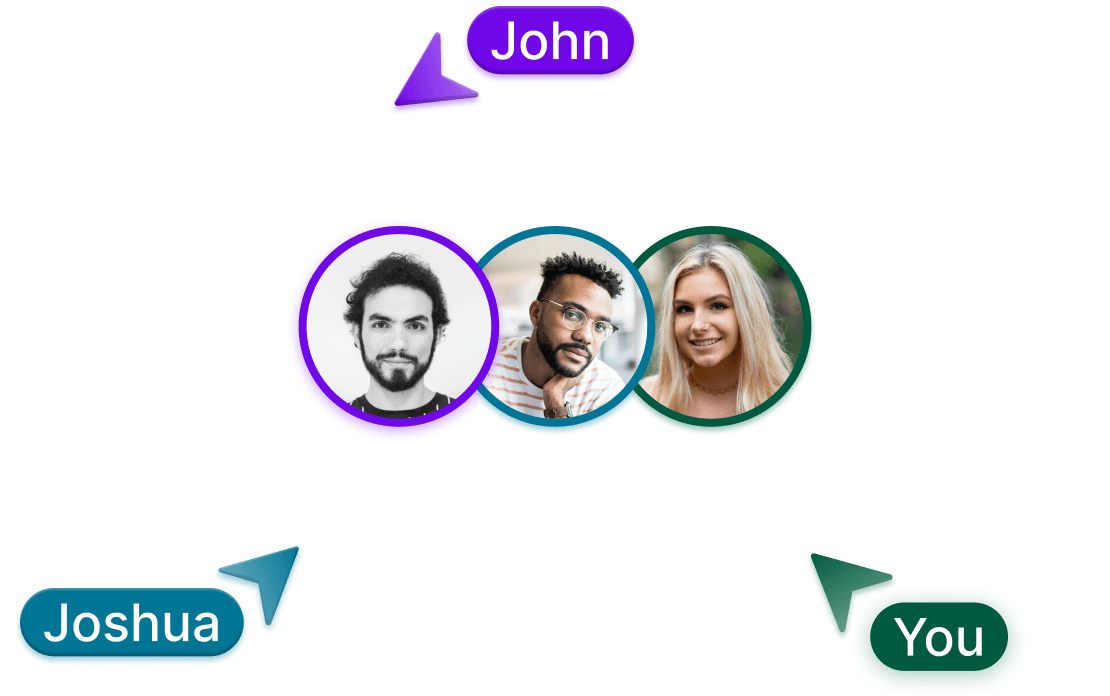
This update is a big one. We’re introducing powerful new ways to collaborate with your team and have completely supercharged the tools you use every day. Your entire workflow is about to get faster, smarter, and more connected. Welcome to the next evolution of Splinde.
Full Release Note
New Features
New Features
Small Changes, Big Difference.
We’re back just weeks after launch. This update is all about flow, reducing clutter, and giving you more power where it counts.
The Highlights:
Reference Anywhere: You can now link values directly inside AddOns. Freedom for your formulas, without writing a single one.
Less Clutter: AddOns are now collapsed by default, keeping your editor clean and scannable.
Sleeker UI: A visual refresh for cost items to make the editing experience more delightful.
Better Workflow: New calculations now open in New Tabs, so you can work side-by-side.
The Fixes:
Under the Hood: Faster load times, better memory usage, and improved stability for large budgets.
Full Release Note
Initial Release
Initial Release
Hello World. Splinde is here.
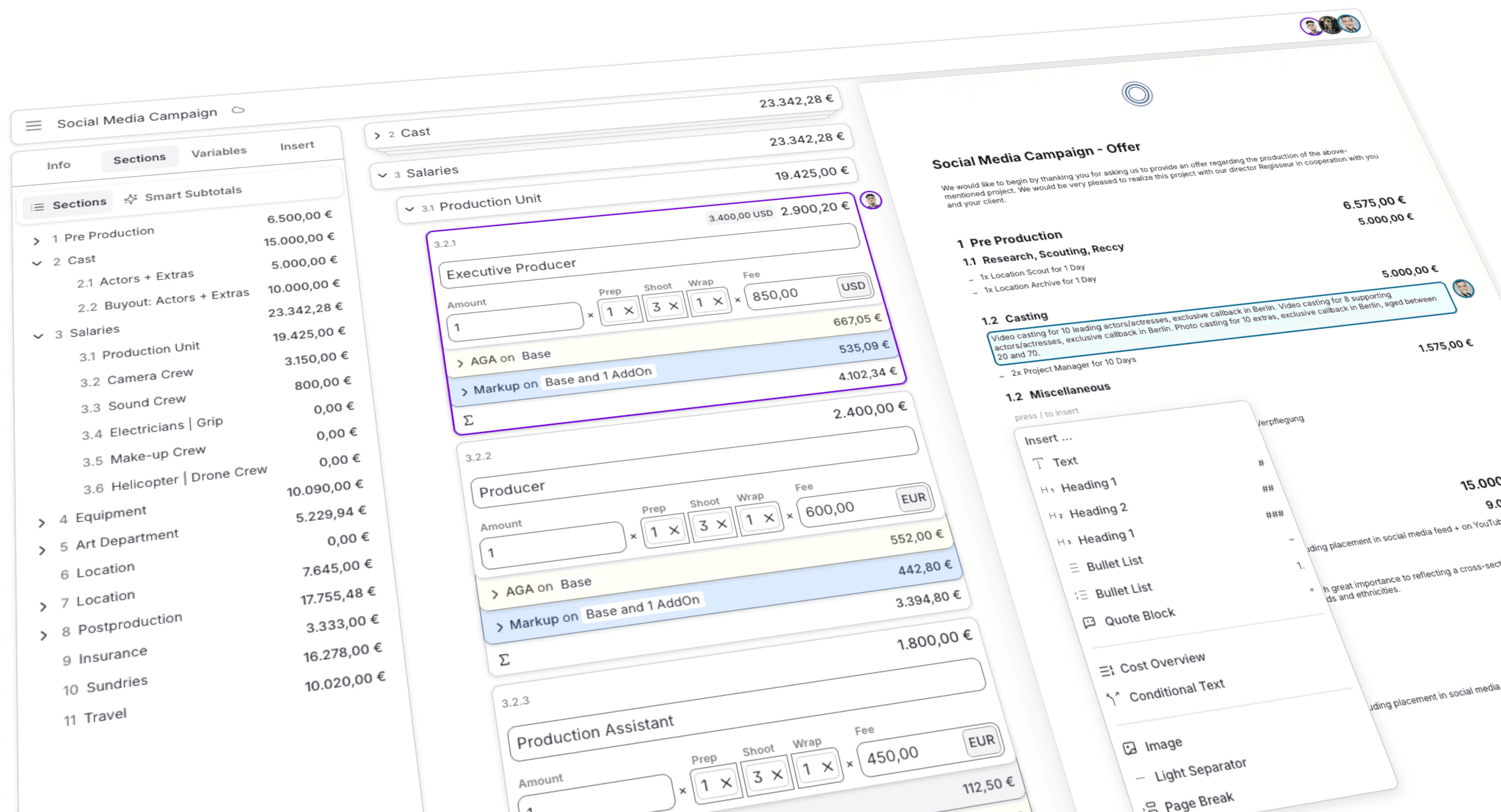
Splinde is officially in public beta. We’re here to replace Excel chaos with a delightful, no-code budgeting experience.
The Highlights:
Drag & Drop Logic: Build cost structures visually. No formulas, just clarity.
"@" Linking: Connect values instantly (e.g.,
@DayRate) without complex syntax.Templates & Import: Start fast with the Gallery or drag in existing SCoPE Excel files.
Live Documents: Turn budgets into PDF offers in real-time.
The Nitty-Gritty:
Faster & Safer: Blazing performance and upgraded security.
Breaking Change: We rebuilt the data model for the future. Old closed-beta calculations won’t carry over—it’s a fresh start for a better foundation.
Welcome to a world without Excel.
Full Release Note
New Features
New Features
Rock Solid, From the Ground Up
Not every improvement is a shiny new feature — some of the best updates are the ones you never have to think about, because things just work. This release is packed with exactly that kind of fix: dozens of small and not-so-small issues resolved across the entire app, so Splinde feels steadier every time you open it.
Full Release Note
Fixes & Improvements
Fixes & Improvements
You Asked. We Listened.
Every one of these updates started the same way: a real conversation with a real production team, telling us exactly where Splinde was getting in their way. This release is our answer — a set of fixes and additions built directly from your feedback.
Full Release Note
New Features
New Features
Color-Code Your Way to a Clearer Budget
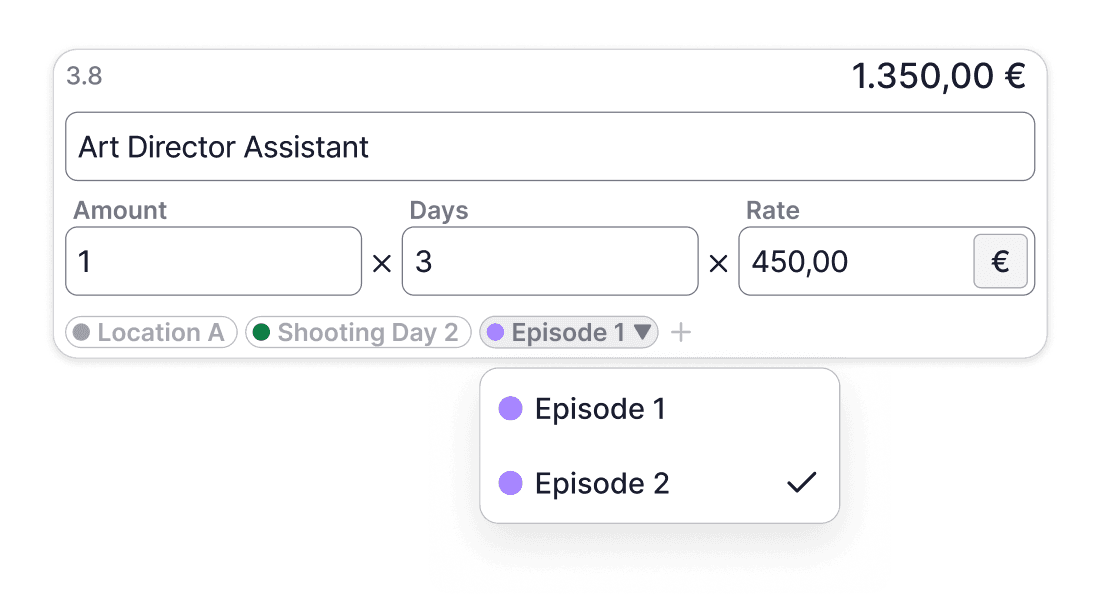
Big budgets get messy. Cost items pile up, and finding "everything we're spending on travel" or "everything still waiting on approval" means scanning line by line. Not anymore — say hello to Cost Item Labels.
Full Release Note
New Features
New Features
A Document Editor Worthy of Your Best Work
This is the update we've been building toward for months. Your documents are no longer just a byproduct of your budget — they're a first-class part of Splinde, with the flexibility, polish, and control you need to send something client-ready without ever opening another app. Here's everything that's new.
Full Release Note
New Features
New Features
Your Budgets, Finally Organized

If you've ever managed more than a handful of budgets in Splinde, you know the feeling: everything lives in one long, flat list, and there's no good way to say "these three belong together" — let alone control who gets to see them. That changes today. Say hello to Projects.
Full Release Note
Changelog
We Ship. Often.
We’re continuously shipping new updates.
Discover the latest features and improvements we’ve imagined for you.
New Features
Your Budgets, Finally Organized
If you've ever managed more than a handful of budgets in Splinde, you know the feeling: everything lives in one long, flat list, and there's no good way to say "these three belong together" — let alone control who gets to see them. That changes today. Say hello to Projects.
Full Release Note
New Features
A Document Editor Worthy of Your Best Work
This is the update we've been building toward for months. Your documents are no longer just a byproduct of your budget — they're a first-class part of Splinde, with the flexibility, polish, and control you need to send something client-ready without ever opening another app. Here's everything that's new.
Full Release Note
New Features
Color-Code Your Way to a Clearer Budget
Big budgets get messy. Cost items pile up, and finding "everything we're spending on travel" or "everything still waiting on approval" means scanning line by line. Not anymore — say hello to Cost Item Labels.
Full Release Note
Fixes & Improvements
You Asked. We Listened.
Every one of these updates started the same way: a real conversation with a real production team, telling us exactly where Splinde was getting in their way. This release is our answer — a set of fixes and additions built directly from your feedback.
Full Release Note
New Features
Rock Solid, From the Ground Up
Not every improvement is a shiny new feature — some of the best updates are the ones you never have to think about, because things just work. This release is packed with exactly that kind of fix: dozens of small and not-so-small issues resolved across the entire app, so Splinde feels steadier every time you open it.
Full Release Note
New Features
Units for Everything
Not every cost item is best measured in currency. This release gives you a whole library of units to describe your budget exactly the way you think about it — and makes sure that choice follows your numbers everywhere they go.
Full Release Note
New Features
Plan every possibility
Main Budget
3.1
Production Unit
19.425,00 €
3.2.1
3.400,00 USD
2.900,20 €
Executive Producer
Amount
1
Prep
1
Shoot
3
Wrap
1
Fee
850,00
USD
3.2.2
2.400,00 €
Producer
Amount
1
Prep
1
Shoot
3
Wrap
1
Fee
600,00
EUR
3.2.3
2.400,00 €
Production Assistant
Amount
1
Prep
1
Shoot
3
Wrap
1
Fee
600,00
EUR
3.2.3
2.400,00 €
Production Assistant
Amount
1
Prep
1
Shoot
3
Wrap
1
Fee
600,00
EUR
Scenario 1
Service in Spain
3.1
Production Unit
– 2.573,00 €
19.123,00 €
3.2.1
3.300,00 USD
2.598,20 €
Executive Producer
Amount
1
Prep
1
Shoot
3
Wrap
1
Fee
750,00
USD
3.2.2
2.400,00 €
Producer
Amount
1
Prep
1
Shoot
3
Wrap
1
Fee
600,00
EUR
3.2.3
2.400,00 €
Production Assistant
Amount
1
Prep
1
Shoot
3
Wrap
1
Fee
600,00
EUR
3.2.3
2.400,00 €
Production Assistant
Amount
1
Prep
1
Shoot
3
Wrap
1
Fee
600,00
EUR
Scenario 2
Service in Mexico
3.1
Production Unit
+10.684,00 €
30.109,00 €
3.2.1
3.400,00 USD
2.900,20 €
Executive Producer
Amount
1
Prep
1
Shoot
3
Wrap
1
Fee
850,00
USD
3.2.2
2.400,00 €
Producer
Amount
1
Prep
1
Shoot
3
Wrap
1
Fee
600,00
EUR
3.2.3
2.400,00 €
Production Assistant
Amount
1
Prep
1
Shoot
3
Wrap
1
Fee
600,00
EUR
3.2.3
2.400,00 €
Production Assistant
Amount
1
Prep
1
Shoot
3
Wrap
1
Fee
600,00
EUR
Say hello to Budget Scenarios, a new way to explore production budgets without losing sight of your approved plan. Test alternatives, compare the impact, and stay ready for the next creative or production change.
Full Release Note
New Features
A Beautifully Reimagined Way to Budget
Download PDF
Social Media Campaign - Offer
We would like to begin by thanking you for asking us to provide an offer regarding the production of the above-mentioned project. We would be very pleased to realize this project with our director Regisseur in cooperation with you and your client.
1
Pre Production
6.575,00 €
1.1
Research, Scouting, Reccy
5.000,00 €
–
1x Location Scout for 1 Day
–
1x Location Archive for 1 Day
1.2
Casting
5.000,00 €
Video casting for 10 leading actors/actresses, exclusive callback in Berlin. Video casting for 8 supporting actors/actresses, exclusive callback in Berlin. Photo casting for 10 extras, exclusive callback in Berlin, aged between 20 and 70.
–
2x Project Manager for 10 Days
1.2
Miscellaneous
1.575,00 €
–
18 x Shooting Boards
Inklusive Directors Recce, inklusive Mietfahrzeug und Verpflegung
Inklusive Pre-PPM per Video mit Regie
Inklusive PPM per Video mit Regie
Inklusive Directors Shooting-Board zum PPM
2
Cast
15.000,00 €
2.1
Principal Actor / Actress
9.000,00 €
1 year of moving images: All media except cinema Including placement in social media feed + on YouTube Photo: Germany: DOOH, OOH, online, social media
Including placement in social media feed Germany.
For us, casting is a central part of the project. We attach great importance to reflecting a cross-section of Germany in the cast – different age groups, backgrounds and ethnicities.
Welcome to Splinde 1.5.0. This update marks a significant milestone in our journey to make budgeting not just efficient, but truly delightful. We’ve touched almost every corner of the experience, from a stunningly redesigned editor to powerful new document tools that help you turn numbers into professional offers in seconds.
Full Release Note
Fixes & Improvements
A Smoother Flow.
It’s all about keeping you in your flow state.
The Power of Enter
Great software should move at the speed of your thought. We’ve refined how you interact with input fields across the entire application.
Whether you are renaming a section in the sidebar, updating a variable, or tweaking a cost item’s fee, you can now simply hit Enter to confirm your change. It sounds simple, but it makes a world of difference. No more clicking away to save; just type, confirm, and keep moving. It’s intuitive, fast, and satisfying.
Improvements & Fixes
Overtime AddOn Refinements: We’ve tightened up the logic in our new Overtime tool. Deleting time markers on the slider now triggers an immediate recalculation, ensuring your totals are always accurate.
Smoother Permissions: We resolved an issue where team members (non-admins) occasionally faced errors when editing Overtime values. Collaboration is now seamless for everyone on the team.
Variable Stability: Fixed a bug where using a newly created variable for the very first time could result in a reference error. It now links instantly, every time.
Performance Boost: We’ve optimized the engine behind AddOns, making the creation process significantly snappier.
Under the Hood: We’ve upgraded our analytics and monitoring infrastructure. This helps us spot stability issues faster and ensures Splinde runs smoothly for everyone.
We hope these updates make your daily budgeting feel a little lighter and a lot faster. As always, we’re listening to your feedback to make Splinde even better.
New Features
Time, Beautifully Managed.
We are introducing the Overtime AddOn and the possibility to calculate Prep-, Shoot- and Wrap-Days. And much more.
This update is dedicated to the most valuable resource on your set: time. We’ve introduced powerful new tools to track it, manage it, and budget for it with unprecedented precision. From granular day breakdowns to a reimagined way to handle overtime, Splinde 1.4.0 gives you total control over your schedule and your budget.
Full Release Note
New Features
Sync in Sync.
Collaboration is at the heart of Splinde, and this update is all about making sure your teamwork is as seamless as possible. We’ve smoothed out the real-time syncing so you can build budgets together with total confidence, along with some thoughtful touches to improve your daily workflow.
Full Release Note
Fixes & Improvements
Exports, Uninterrupted.
We’re popping in with a quick but important update to ensure your workflow remains seamless. We believe that sharing your budget should be as effortless as building it, so this release is dedicated to making sure your documents are ready whenever you are.
🛠 Fixes & Improvements
Reliable PDF Downloads: We resolved an issue that was preventing some budgets from exporting correctly. You can now generate and download your PDF documents with confidence—crisp, clean, and ready for your team.
New Features
Precision Meets Performance
Welcome to Splinde 1.3.0. With this update, we’ve focused on the very core of your experience, making your calculations smarter, your large projects faster, and your workflow smoother than ever before. We think you’re going to love the difference.
Full Release Note
New Features
A Quantum Leap for Your Calculations
At the heart of Splinde is the power to handle complex numbers with ease. In version 1.2.8, we’ve performed a major upgrade to the engine that drives your budgets, making your experience faster, smarter, and more fluid than ever before.
Full Release Note
Performance
Enhanced Stability for Large Templates
We know that some of your projects require robust, data-rich templates to get started. We have optimized our engine to better handle heavy-duty templates, specifically ensuring that creating budgets from the SCoPE GWA KVA (German) template is now a smooth, error-free experience. You can now rely on these complex templates to load perfectly every time, letting you focus on the numbers rather than the tools.
Bug Fixes
Bug Fixes & Performance Improvements
This update is all about stability. We’ve been focused on tracking down and fixing a few pesky bugs to make your entire workflow smoother and more predictable.
Duplicating cost items that include a Markup AddOn now works flawlessly.
We fixed an issue that could prevent the context menu from opening correctly, restoring quick access to your actions.
New Features
Bug Fixes & Performance Improvements
We’ve performed a major overhaul on the calculation engine for AddOns. Adding, deleting, or modifying Markups, AGA, and KSK AddOns is now rock-solid, ensuring your base values and totals are always accurate and predictable.
Getting removed from an active workspace will no longer lock you out of the app. Splinde will now intelligently switch you to another available workspace so you can get right back to work.
Fixed a permission issue where newly added administrators in a workspace couldn't create new templates.
Your currently active workspace is now always clearly visible and highlighted in the workspace dropdown and settings.
We've cleaned up the display of referenced items in input fields to hide their internal IDs, making for a much cleaner look.
References added within a markup add-on will now correctly stay in place after being set.
Squashed a visual bug in the variable list where the unit pill could sometimes overlap other elements.
New Features
Your Budgets, Your Currency.
This update is all about refinement and reliability. We’ve polished the core experience, supercharged collaboration, and introduced a powerful new way to manage your finances on a global scale. Splinde is now more stable, intuitive, and flexible than ever before.
Full Release Note
New Features
Collaboration, Evolved.
Last week, we introduced the first steps toward real-time collaboration in Splinde. Today, we’re taking a giant leap forward. This update makes working together smoother and more seamless than ever, with powerful new ways to manage your team and a host of refinements that polish your entire workflow.
Full Release Note
Bug Fixes
A Little Polish Makes a Big Difference
This update is dedicated to making your Splinde experience even more seamless. We've tackled a few key bugs based on your feedback to ensure your workflow is smooth, reliable, and predictable.
Fixes & Improvements
We fixed a pesky bug that could sometimes prevent you from adding new variables to your budget.
You can trust your links again. We resolved an issue where some references were incorrectly shown as broken when they were perfectly fine.
We've tidied up our pop-up windows, making sure they always fit perfectly on your screen.
Thanks for helping us spot these issues! Your feedback is essential as we continue to build a better future for budgeting.
New Features
Work Better, Together
This update is a big one. We’re introducing powerful new ways to collaborate with your team and have completely supercharged the tools you use every day. Your entire workflow is about to get faster, smarter, and more connected. Welcome to the next evolution of Splinde.
Full Release Note
New Features
Small Changes, Big Difference.
We’re back just weeks after launch. This update is all about flow, reducing clutter, and giving you more power where it counts.
The Highlights:
Reference Anywhere: You can now link values directly inside AddOns. Freedom for your formulas, without writing a single one.
Less Clutter: AddOns are now collapsed by default, keeping your editor clean and scannable.
Sleeker UI: A visual refresh for cost items to make the editing experience more delightful.
Better Workflow: New calculations now open in New Tabs, so you can work side-by-side.
The Fixes:
Under the Hood: Faster load times, better memory usage, and improved stability for large budgets.
Full Release Note
Initial Release
Hello World. Splinde is here.
Splinde is officially in public beta. We’re here to replace Excel chaos with a delightful, no-code budgeting experience.
The Highlights:
Drag & Drop Logic: Build cost structures visually. No formulas, just clarity.
"@" Linking: Connect values instantly (e.g.,
@DayRate) without complex syntax.Templates & Import: Start fast with the Gallery or drag in existing SCoPE Excel files.
Live Documents: Turn budgets into PDF offers in real-time.
The Nitty-Gritty:
Faster & Safer: Blazing performance and upgraded security.
Breaking Change: We rebuilt the data model for the future. Old closed-beta calculations won’t carry over—it’s a fresh start for a better foundation.
Welcome to a world without Excel.
Full Release Note

The future of production budgeting.
Discover, how Splinde can streamline your budgeting.
" width="14.000000299020257px"><path d="M 0 2.652 L 1.365 4.212 L 3.2 5.385 L 3.52 2.662 L 3.2 0 L 1.329 1.03 Z" fill="rgb(0, 131, 45)" height="5.384981000453159px" id="SudOce0vk" transform="translate(7.92 3.107)" width="3.5195954251328203px"/><path d="M 0 0.48 L 0 2.8 C 0 3.33 0.43 3.76 0.96 3.76 L 3.28 3.76 L 3.76 2.006 L 3.28 0.48 L 1.688 0 Z" fill="rgb(0, 102, 218)" height="3.7595678404828874px" id="ptqOLp7eZ" transform="translate(0 7.758)" width="3.7595678404827595px"/><path d="M 3.28 0 L 0 3.28 L 1.688 3.76 L 3.28 3.28 L 3.752 1.774 Z" fill="rgb(233, 66, 53)" height="3.7595678404827595px" id="WJAuODGl2" width="3.7515687599711782px"/><path d="M 3.28 0 L 0 0 L 0 4.959 L 3.28 4.959 Z" fill="rgb(38, 132, 252)" height="4.959429917232605px" id="qovcPZtCe" transform="translate(0 3.279)" width="3.279623009782881px"/><path d="M 9.935 0.11 L 7.839 1.828 L 7.839 7.213 L 9.944 8.939 C 10.26 9.186 10.72 8.961 10.72 8.56 L 10.72 0.481 C 10.72 0.075 10.249 -0.147 9.935 0.11 Z M 4.639 4.48 L 4.639 6.96 L 0 6.96 L 0 10.24 L 6.879 10.24 C 7.41 10.24 7.839 9.81 7.839 9.28 L 7.839 7.213 Z" fill="rgb(0, 172, 71)" height="10.239776677658213px" id="N0Tu670pH" transform="translate(3.28 1.279)" width="10.72037917475268px"/><path d="M 6.879 0 L 0 0 L 0 3.28 L 4.639 3.28 L 4.639 5.759 L 7.839 3.108 L 7.839 0.96 C 7.839 0.43 7.41 0 6.879 0 Z" fill="rgb(255, 186, 0)" height="5.759337968399116px" id="DgEWgdbIb" transform="translate(3.279 0)" width="7.83909890143218px"/></g></svg>)
Powering the world’s best production teams.
From next-gen producers to established media productions.